
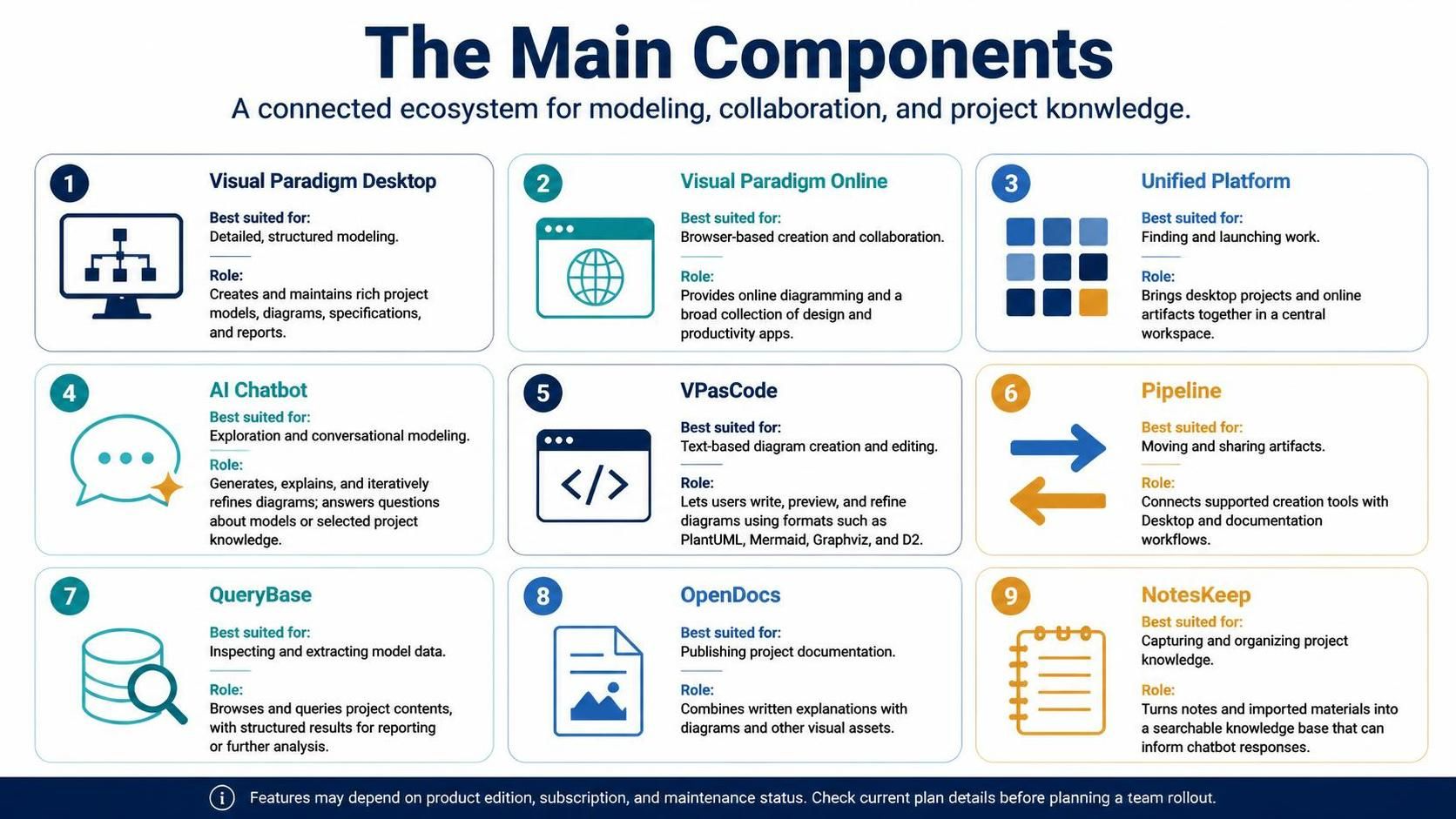
In the modern landscape of software engineering and enterprise architecture, the sheer volume of tools available can often lead to fragmentation. Teams may find themselves switching between desktop applications for deep modeling, web browsers for collaboration, and command-line interfaces for rapid prototyping. Visual Paradigm has addressed this challenge by constructing a cohesive AI Ecosystem designed to unify these disparate workflows into a single, intelligent platform. This tutorial explores the system architecture of this ecosystem, breaking down how each component interacts to support the full lifecycle of model creation, analysis, and documentation.
The Core Philosophy: A Unified Workspace
At the heart of the Visual Paradigm AI Ecosystem is the Unified Platform. This is not merely a launcher; it serves as the central nervous system of the architecture. Its primary role is to bridge the gap between heavy-duty desktop modeling and agile, browser-based collaboration. By bringing desktop projects and online artifacts into a central workspace, it eliminates the friction of data silos. Whether you are working offline in a secure environment or collaborating in real-time with a distributed team, the Unified Platform ensures that the context remains consistent.
Deep Dive: Component Roles and Capabilities
To fully leverage this ecosystem, one must understand the specific function of each component. They are not redundant; rather, they are specialized tools optimized for different stages of the modeling process.
1. Visual Paradigm Desktop: The Foundation
The Desktop application remains the powerhouse for detailed, structured modeling. It is best suited for creating and maintaining rich project models, complex diagrams, and comprehensive specifications. When precision is paramount and the project scope is large, the Desktop environment provides the necessary depth to manage dependencies, version control, and intricate relationships that web-based tools often simplify.
2. Visual Paradigm Online: Collaboration at Scale
For teams requiring flexibility, Visual Paradigm Online offers a browser-based solution. It excels in creation and collaboration, providing a broad collection of design and productivity apps without the overhead of local installation. This component is ideal for brainstorming sessions, quick iterations, and sharing diagrams with stakeholders who do not require full modeling capabilities.
3. VPasCode: The Developer’s Edge
Modern engineering increasingly relies on “Infrastructure as Code” principles. VPasCode brings this philosophy to diagramming. It allows users to write, preview, and refine diagrams using text-based formats such as PlantUML, Mermaid, Graphviz, and D2. This is crucial for developers who prefer version-controlled, text-based workflows over drag-and-drop interfaces.
@startuml
actor User
participant "System" as Sys
User -> Sys: Request Data
activate Sys
Sys -> Sys: Process Logic
Sys --> User: Return Result
deactivate Sys
@enduml
4. The AI Chatbot: Conversational Intelligence
The integration of AI transforms the ecosystem from a passive repository to an active assistant. The AI Chatbot facilitates exploration and conversational modeling. It can generate diagrams from natural language prompts, explain complex model structures, and iteratively refine designs based on user feedback. Furthermore, it serves as a query engine for project knowledge, answering questions about models directly within the workflow.
5. Supporting Utilities: Pipeline, QueryBase, and OpenDocs
The ecosystem is further strengthened by specialized utilities:
- Pipeline: Automates the movement and sharing of artifacts, connecting creation tools with documentation workflows.
- QueryBase: Enables advanced inspection and extraction of model data, providing structured results for reporting or further analysis.
- OpenDocs: Streamlines the publishing process by combining written explanations with diagrams and visual assets into professional documentation.
Knowledge Management: NotesKeep
One of the most significant challenges in enterprise modeling is retaining institutional knowledge. NotesKeep addresses this by turning scattered notes and imported materials into a searchable knowledge base. This component is uniquely integrated with the AI Chatbot, allowing the chatbot to inform its responses based on the structured knowledge captured in NotesKeep, ensuring that the AI is contextually aware of your specific project history.
Strategic Implementation and Best Practices
When designing a team rollout, it is essential to recognize that the exact features available can depend on the product edition, subscription, and maintenance status. A successful implementation strategy involves mapping these components to specific user roles:
- Architects: Utilize Desktop for core modeling and QueryBase for validation.
- Developers: Leverage VPasCode for version-controlled diagrams and AI Chatbot for rapid prototyping.
- Stakeholders: Access Visual Paradigm Online and OpenDocs for high-level review and approval.
Conclusion
The Visual Paradigm AI Ecosystem represents a shift from tool-centric modeling to workflow-centric architecture. By unifying desktop power, online collaboration, text-based coding, and AI-driven intelligence, it offers a comprehensive environment for modern system design. Understanding the distinct role of each component allows teams to maximize efficiency, ensuring that the right tool is used for the right task at the right time.