
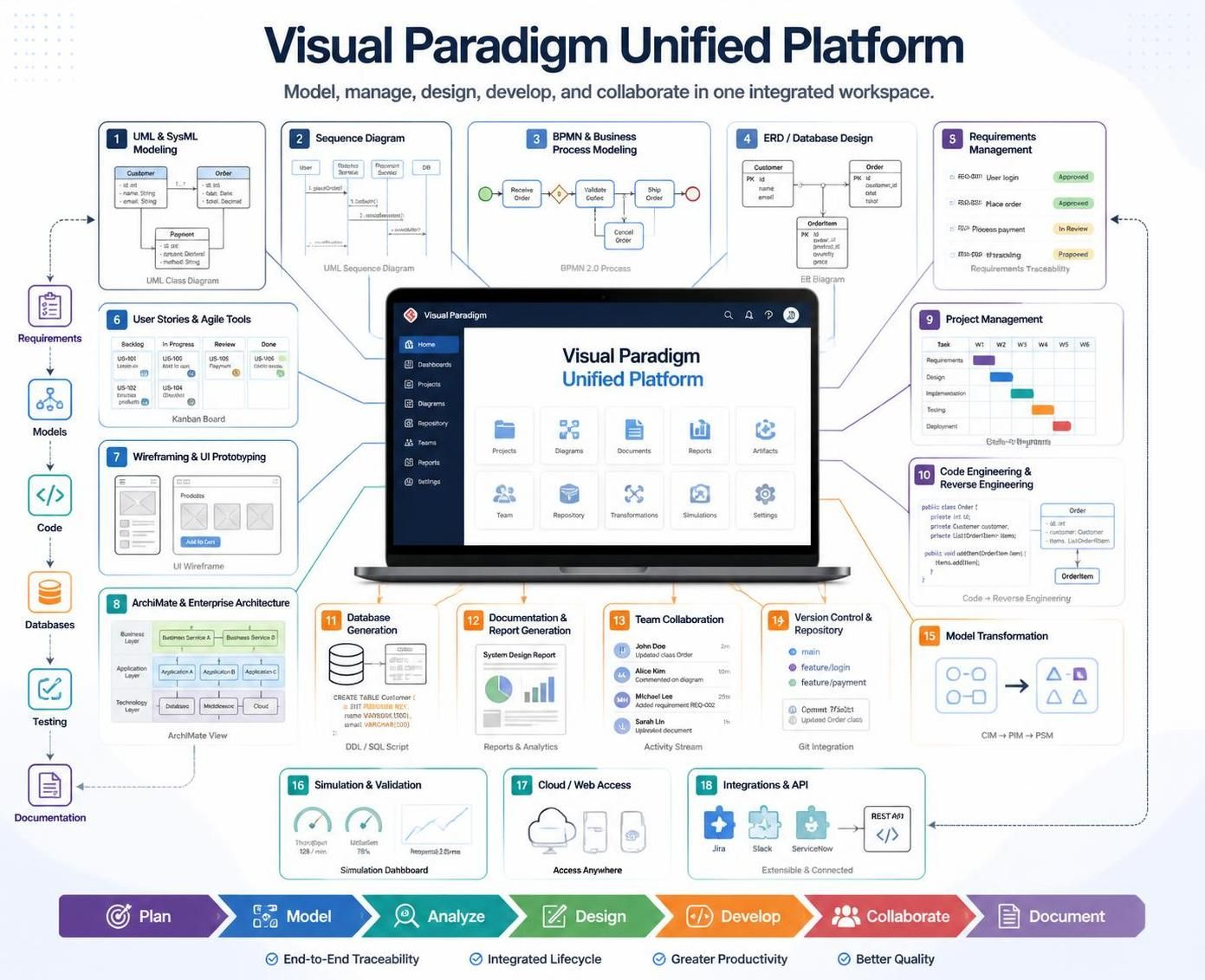
In the complex world of software development and enterprise architecture, the greatest challenge is often not the lack of tools, but the fragmentation of them. Teams often find themselves switching between spreadsheet-based project management, standalone modeling tools, and IDEs for coding, losing the “big picture” along the way.
The Visual Paradigm Unified Platform addresses this by acting as a central hub. It integrates visual modeling, business analysis, agile planning, project management, and code engineering into a single, connected workspace. This tutorial explores the system architecture of this platform, breaking down how it connects disparate artifacts into a cohesive lifecycle.
The Architecture of Integration
At its core, the Visual Paradigm Unified Platform is designed to bridge the gap between high-level strategic planning and low-level technical implementation. Unlike traditional tools that treat diagrams as static deliverables, this platform treats them as living components of a project.
The system architecture revolves around a central workspace—accessible via the Visual Paradigm Desktop or a web browser—that hosts:
- Shared Artifacts: Models, requirements, and documents that are accessible to all team members.
- Tooling Ecosystem: A unified interface to launch specific applications like the BPMN editor or the Kanban board.
- AI Ecosystem: Integrated utilities that assist in generating models and analyzing data.
This architecture ensures end-to-end traceability. A requirement defined in the Business Analysis phase is not just a document; it is a linked object that traces back to a specific user story in Agile planning, and eventually forward to the code implementation.
Deconstructing the Capability Areas
The platform organizes its massive feature set into distinct yet interconnected domains. Let’s walk through the key areas illustrated in the platform’s ecosystem.
1. Visual Modeling and Enterprise Architecture
The foundation of the platform is its robust modeling engine. It goes beyond simple UML class diagrams to support:
- UML & SysML: For software and systems design, covering Class, Sequence, and State Machine diagrams.
- Business Process Modeling (BPMN): For defining complex workflows and decision tables.
- Enterprise Architecture (ArchiMate/TOGAF): For mapping strategic goals to application layers and technology infrastructure.
2. Business and Product Management
Bridging the gap between business needs and technical execution, the platform offers:
- Requirements Management: Tools for capturing, approving, and tracing requirements (e.g., ensuring a “User Login” requirement is satisfied).
- Agile & Product Management: Integrated Kanban boards, User Story maps, and Sprint planning tools that allow teams to manage backlogs without leaving the modeling environment.
3. Design, Code, and Database Engineering
This is where the platform shines by connecting design to implementation:
- UX & Prototyping: Wireframes and storyboards can be created to visualize the user journey before a single line of code is written.
- Database Engineering: The platform supports ER diagrams, schema design, and database generation (DDL scripts).
- Code Engineering: It features Round-Trip Engineering. This means you can generate code from your models, and conversely, reverse engineer existing codebases to update your diagrams automatically.
The Lifecycle: Plan, Model, Analyze, Design, Develop, Collaborate
The platform supports a linear yet iterative lifecycle. The workflow typically begins with Planning and Modeling, where the architecture is defined. It moves into Analyzing and Designing, where detailed UX and API specifications are created. Finally, in the Develop and Collaborate phases, the team executes the work, manages version control, and generates reports.
Crucially, the platform supports Cloud and Web Access. This ensures that the “Single Source of Truth” is available to remote teams, allowing them to access the same artifacts, comments, and version history regardless of their physical location.
Advanced Feature: AI-Assisted Work
Incorporating modern intelligence, the platform includes AI-assisted utilities. These tools can assist in:
- Text-to-Diagram Generation: Converting natural language descriptions into visual models.
- Model Analysis: Identifying inconsistencies or potential performance bottlenecks in a design.
- Diagram Refinement: Automatically adjusting layout and alignment for cleaner presentation.
Conclusion
The Visual Paradigm Unified Platform represents a shift from siloed tooling to a holistic engineering ecosystem. By integrating the capabilities of planning, modeling, and coding into one connected workspace, it reduces the friction between business stakeholders and technical teams, ensuring that the final product aligns perfectly with the original vision.