
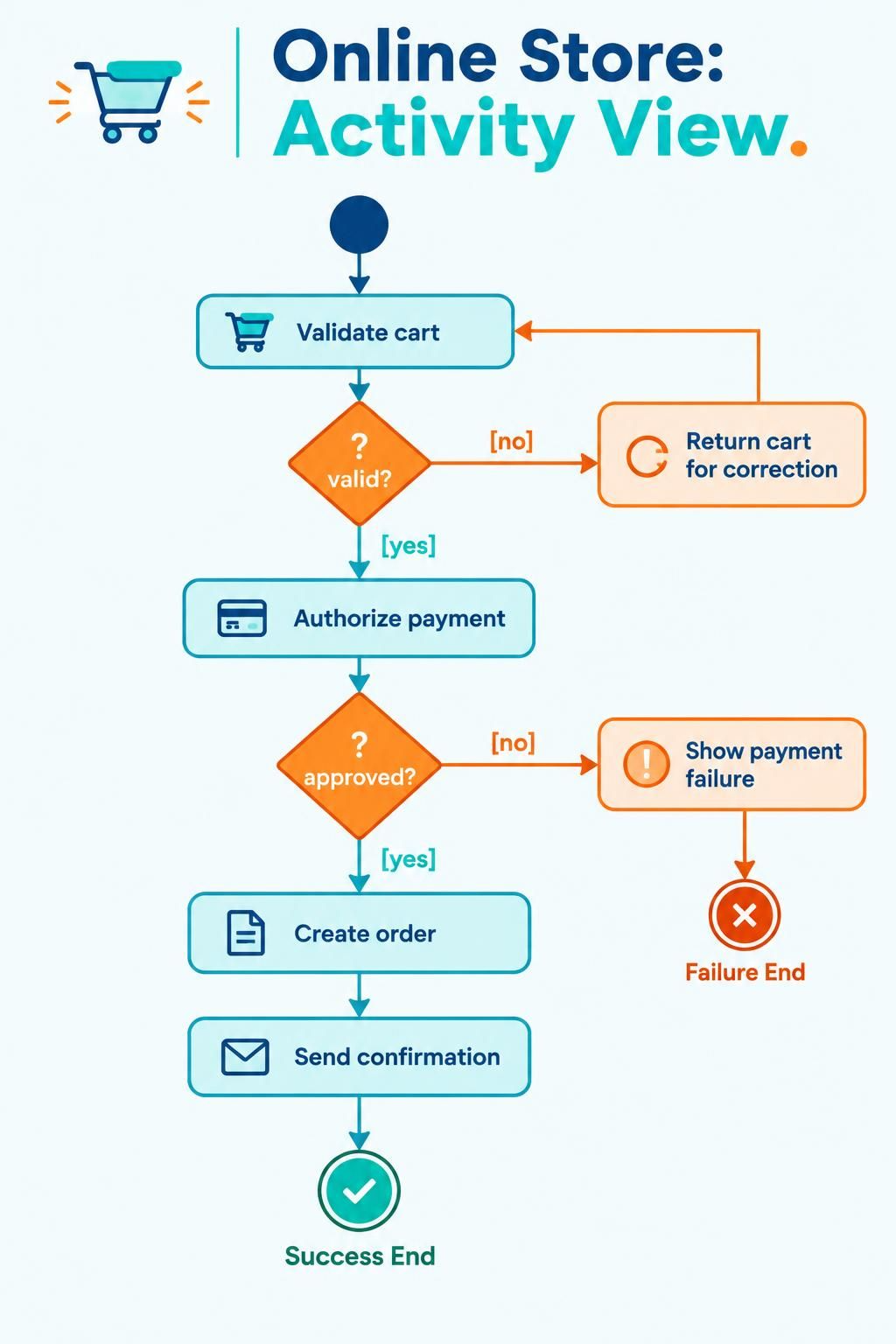
Designing robust e-commerce systems requires more than just backend logic; it requires a visual blueprint that clearly communicates complex workflows, decision points, and error handling. In this tutorial, we will deconstruct the Online Store Activity View shown in the provided image. We will explore how to model this system using UML Activity Diagrams, specifically focusing on the checkout process using the VPasCode tool within Visual Paradigm.
Activity diagrams are the standard for modeling the flow of control from one activity to another. They are particularly useful for describing the business logic behind a specific function, such as the “Checkout” workflow, where an order must be validated, paid for, and confirmed.
Deconstructing the Activity Flow
Let’s break down the steps visible in the diagram to understand the underlying logic:
- Start Node: The process begins with a solid black circle, representing the initiation of the checkout sequence.
- Validate Cart: The first activity checks the contents of the user’s shopping cart. This is a critical gatekeeping step.
- Decision Point (valid?): A diamond shape represents a decision. If the cart is [no], the flow diverts to a correction loop. If [yes], it proceeds to payment.
- Authorize Payment: The system attempts to charge the user’s method of payment.
- Decision Point (approved?): Another decision diamond. If the payment is [no], the process ends in failure. If [yes], it moves to fulfillment.
- End Nodes: The diagram features two distinct end states: a green circle with a checkmark for a Success End and a red circle with an ‘X’ for a Failure End.
Modeling with VPasCode
Visual Paradigm’s VPasCode tool allows developers to write code that automatically generates UML diagrams. This approach is “AI friendly” and ensures version control over your diagrams. Below is the PlantUML syntax that generates the specific activity flow depicted in the image.
PlantUML Source Code
Copy the following code into the VPasCode editor to generate the diagram:
@startuml
title Online Store: Activity View

start

:Validate cart;

if (valid?) then (yes)
  :Authorize payment;
  if (approved?) then (yes)
    :Create order;
    :Send confirmation;
    :Success End;
  else (no)
    :Show payment failure;
    :Failure End;
  endif
else (no)
  :Return cart for correction;
  stop
endif

@enduml
Note: In the actual VPasCode tool, you can refine the styling by adding specific directives to match the colors (teal for success, orange for failure) and icons shown in the original image.
Why Visual Paradigm UML?
While text editors are powerful, visual modeling tools offer distinct advantages for system architecture:
- Visual Paradigm UML: Provides a comprehensive environment that supports both drag-and-drop design and code-first generation via VPasCode.
- AI Chatbot Integration: Modern tools integrate AI assistants that can help generate boilerplate code or suggest optimizations for your workflow logic.
- Benefits of VPasCode: It bridges the gap between developers and business analysts. You can write code to define logic and instantly see the visual representation, ensuring the diagram never becomes “stale” or out of sync with the design.
Handling Alternate Branches
A common mistake in activity modeling is focusing only on the “Happy Path” (the ideal scenario where everything goes right). The image provided demonstrates the importance of Alternate Branches:
- Correction Loop: When the cart is invalid, the flow does not just stop; it loops back to the “Validate cart” step, allowing the user to correct the data.
- Failure Outcomes: When payment is declined, the system explicitly routes to a “Failure End” state rather than crashing or hanging.
Conclusion
By utilizing tools like Visual Paradigm and its VPasCode feature, you can create precise, executable models of your system architecture. Whether you are validating a shopping cart or authorizing a payment, clear activity diagrams ensure that your team understands the full lifecycle of a process, including all potential failure points.