
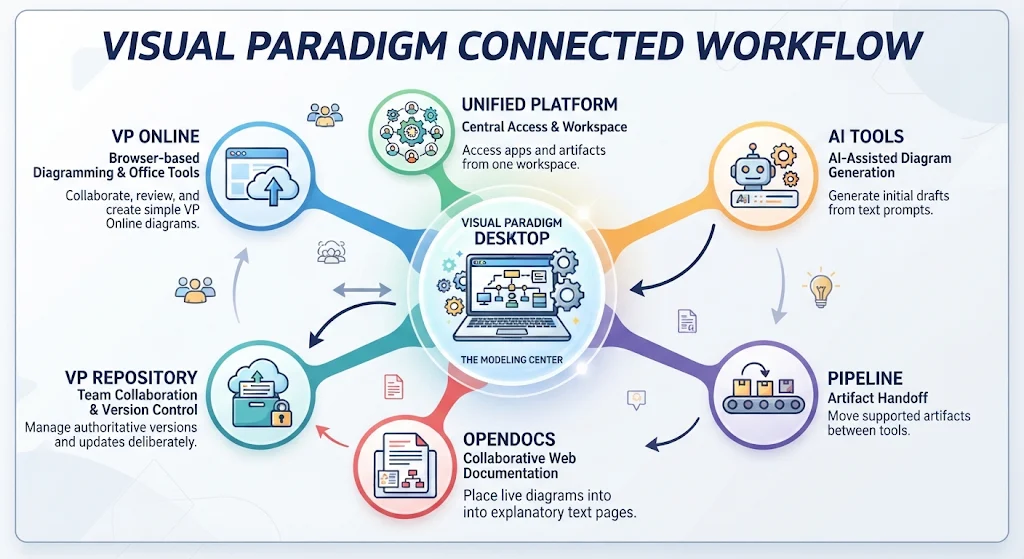
Modern enterprise architecture requires more than just drawing boxes and arrows; it demands a cohesive ecosystem where ideas evolve into rigorous models and eventually become living documentation. The Visual Paradigm Connected Workflow represents a strategic integration of tools designed to bridge the gap between creative ideation and technical precision.
This tutorial explores how to architect a robust modeling process that leverages the power of Visual Paradigm Desktop as the central modeling hub, supported by AI tools for rapid prototyping, the Unified Platform for centralized access, and the Pipeline/OpenDocs ecosystem for seamless documentation handoffs.
1. The Core Architecture: Visual Paradigm Desktop
At the heart of the Visual Paradigm ecosystem lies the Visual Paradigm Desktop. Think of this as your dedicated “workbench” or engineering environment. While online tools offer convenience, Desktop provides the depth required for complex projects.
When should you designate Desktop as your primary workspace?
- Detailed Modeling: When a diagram requires granular control over layout, properties, or structural integrity.
- Project Maintenance: For ongoing projects where version control and deep analysis are necessary.
- Engineering Capabilities: Leveraging advanced features that might be too heavy for a browser-based interface.
In the connected workflow, Desktop serves as the “Modeling Center.” It is where the authoritative versions of your artifacts are born and refined.
2. Rapid Prototyping with AI Tools
The workflow often begins not with a blank canvas, but with a prompt. The integration of AI Tools allows teams to jumpstart the modeling process.
The AI acts as a brainstorming partner, capable of generating initial drafts of diagrams based on text prompts. However, the workflow explicitly states that AI-generated output should be treated as a first draft, not an approved design. It is the responsibility of the modeler to:
- Verify accuracy against business requirements.
- Ensure terminology consistency.
- Validate that important relationships and flows are represented correctly.
Once the AI draft is reviewed and refined, it may be moved into Desktop for further engineering or kept in VP Online if collaborative editing is the priority.
3. The Unified Platform: Your Central Command
With multiple tools in play, navigation can become chaotic. The Unified Platform solves this by acting as a central workspace for discovering apps and accessing artifacts across the ecosystem. It organizes access but does not replace the individual tools.
For Desktop users, the Unified Platform is accessible via Team / Unified Platform > Unified Platform. It serves as the starting point to find or launch relevant applications and locate work, ensuring that team members can navigate the ecosystem efficiently regardless of where the specific artifact is hosted.
4. The Handoff: Pipeline and OpenDocs
One of the most critical challenges in enterprise modeling is keeping diagrams synchronized with documentation. The Pipeline and OpenDocs components address this through a managed handoff system.
The Pipeline Mechanism
The Pipeline acts as a transfer route for supported artifacts. It is not a magical, continuous sync button; rather, it is a deliberate handoff mechanism. When a diagram is finalized in Desktop, it is sent to the cloud-based Pipeline. This requires an internet connection and triggers the transfer to the OpenDocs ecosystem.
OpenDocs for Contextual Documentation
OpenDocs is where the “story” of the diagram is told. It is a collaborative web documentation tool that allows you to combine diagrams with explanatory text. The workflow dictates that a diagram is easiest to use when it appears near the text that explains it.
By placing the diagram in OpenDocs, you can add:
- The diagram’s purpose and scope.
- Assumptions and decision rationale.
- Context for requirements documents, architecture references, or onboarding materials.
5. The Step-by-Step Workflow
To successfully implement this architecture, follow this end-to-end process:
- Start with an Idea: Draft a diagram using AI or start directly in Desktop/VP Online. Keep relevant requirements and notes handy.
- Review and Refine: Treat AI output as a draft. Refine the model in Desktop for engineering depth or VP Online for collaboration. Crucial Step: Agree on which version is the authoritative source.
- Access via Unified Platform: Use the Unified Platform to locate the relevant apps and artifacts.
- Send through Pipeline: In Desktop, right-click the diagram, choose
Export > Send to OpenDocs Pipeline, and save the project. Add a comment identifying the artifact’s purpose. - Place in OpenDocs: In OpenDocs, insert the artifact via the
Insert > Pipelinemenu. Add the surrounding explanatory text to provide context. - Publish Updates Deliberately: When the source diagram changes, update it in Desktop and re-send it through the Pipeline. Then, update the OpenDocs page to ensure the diagram and its text explanation remain aligned.
Conclusion
The Visual Paradigm Connected Workflow is not merely about software integration; it is about establishing a disciplined process. By designating Desktop as the modeling center, utilizing AI for speed, and managing the handoff to OpenDocs via the Pipeline, teams can ensure that their diagrams remain accurate, contextualized, and authoritative throughout the project lifecycle.