
In the fast-paced world of software development, the gap between high-level architectural vision and the gritty reality of implementation often becomes a chasm of misunderstanding. For years, teams have struggled with “living documentation” that rots the moment the code changes. Enter the C4 Model Level 4—the code-level view—and the modern tooling revolution led by Visual Paradigm, VPasCode, and AI assistance.
This tutorial explores how Agile teams and Enterprise Architects can leverage these technologies to transform class diagrams from static, outdated artifacts into dynamic, code-aligned assets. We will move beyond traditional, manual UML drawing and embrace a “Diagram-as-Code” approach that fits naturally into modern CI/CD pipelines.
Understanding the Hierarchy: Where Does Level 4 Fit?
The C4 model is a hierarchical approach to software architecture visualization, designed to describe software systems at four distinct levels of abstraction. To understand the power of Level 4, we must briefly look at where it sits:
- Level 1 (Context): The system and its users in a broad environment.
- Level 2 (Container): The high-level technical stack (e.g., web apps, databases, microservices).
- Level 3 (Component): The major building blocks within a container (e.g., Order Service, Payment Gateway).
- Level 4 (Code): The granular implementation details inside a component.
While Levels 1 through 3 are crucial for stakeholders to understand the system’s scope, Level 4 is the developer’s playground. It represents the actual classes, interfaces, methods, and attributes that make up the software. In the context of the C4 model, a Level 4 diagram is essentially a focused Class Diagram.
Why C4 Level 4 is Different from Traditional UML
Traditional UML class diagrams often suffer from “analysis paralysis,” where developers attempt to model every single attribute and method in a system. This leads to diagrams that are overwhelming and impossible to maintain. The C4 approach to Level 4 is fundamentally different:
- Purpose-Driven: You do not diagram everything. You diagram only what is necessary to solve a specific problem, such as explaining a design pattern, onboarding a new hire, or planning a refactoring effort.
- Visual Storytelling: It highlights relationships (inheritance, composition, association) and key methods rather than serving as a complete API reference.
- Consistency: The classes in your Level 4 diagram must strictly align with the components defined in Level 3.
The Modern Stack: Visual Paradigm, VPasCode, and AI
Historically, creating these diagrams was a manual, error-prone process. The introduction of Visual Paradigm‘s integrated ecosystem changes the game. Here is how the three pillars work together:
1. Visual Paradigm: The Modeling Engine
Visual Paradigm provides the native support required to handle the C4 model. It offers pre-built templates for all four levels and ensures that the shapes and notations used are consistent with the industry-standard C4 syntax. It allows for “drill-down” navigation, letting you click on a component in a Level 3 diagram and instantly see the Level 4 code details underneath.
2. VPasCode: Diagram-as-Code
This is the game-changer for Agile teams. VPasCode bridges the gap between visual modeling and code-based diagram generation. It supports PlantUML syntax, allowing developers to write diagrams using the same text editors they use for their source code.
By treating diagrams as code, teams gain:
- Version Control: Diagrams can be committed to Git repositories alongside source code.
- Collaboration: Teams can use Pull Requests to review architectural changes just like code changes.
- Automation: Diagrams can be automatically generated from code annotations, ensuring the documentation never drifts from reality.
3. AI-Assisted Features
Modern AI capabilities embedded within Visual Paradigm streamline the creation process. Instead of manually typing out relationships, developers can describe a class structure in plain English, and the AI will generate the necessary PlantUML code. Furthermore, AI can scan existing codebases to suggest class diagram structures or identify common design patterns that need visualization.
Step-by-Step: Creating a C4 Level 4 Diagram
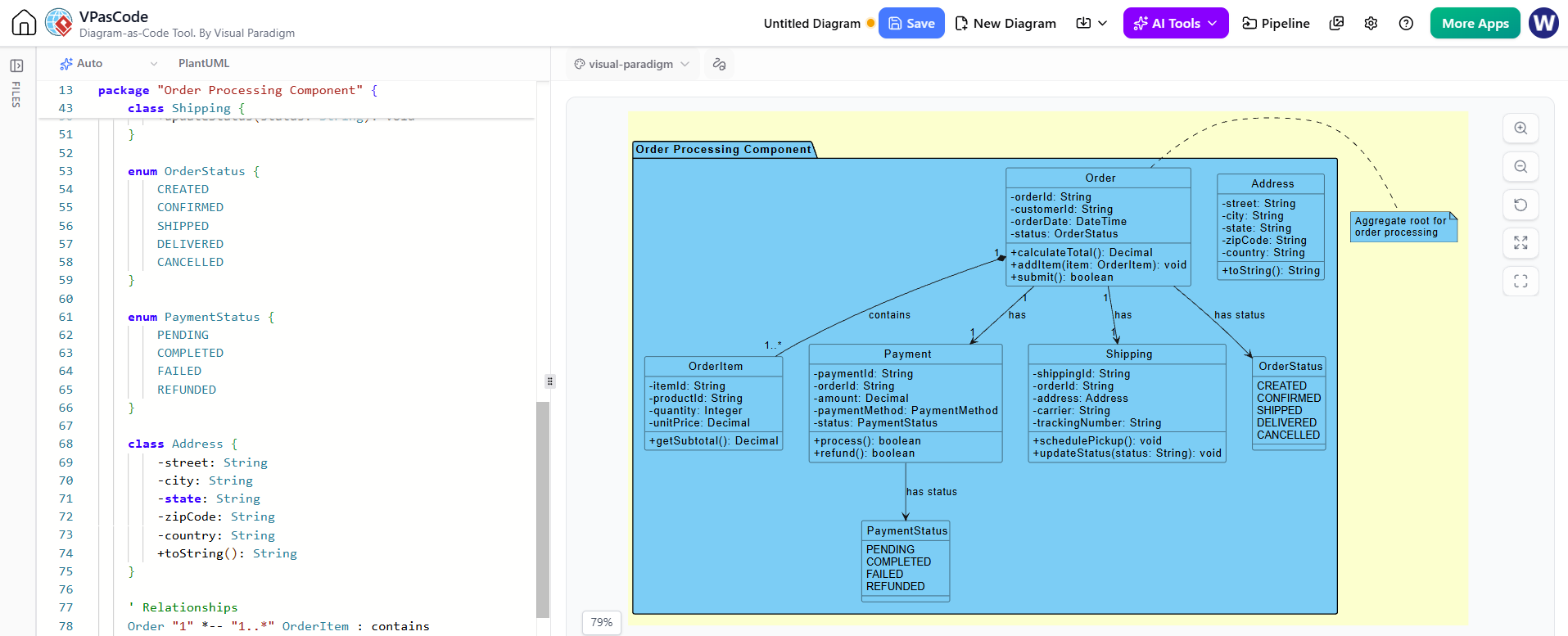
Let’s walk through the process of creating a focused Level 4 diagram for an E-Commerce Order Processing module. We will focus on the “Order” and “OrderItem” classes to demonstrate the principles of selective detail.
Step 1: Define the Context and Scope
Before writing a single line of code, determine the narrative. Are you trying to show how an order is created? Are you explaining the payment strategy? For this example, let’s focus on the core domain model of an Order.
Step 2: Write the PlantUML Code
Using VPasCode, you define the package (representing the Level 3 component) and the classes within it. Notice how we define attributes (prefixed with -) and methods (prefixed with +), along with their data types.
@startuml
skinparam backgroundColor #FEFECE
skinparam borderColor black
skinparam shadowing false

' Define styles for C4 Level 4
skinparam class {
  BackgroundColor White
  BorderColor Black
}

package "Order Processing Component" {
  class Order {
    -orderId: String
    -customerId: String
    -orderDate: DateTime
    -status: OrderStatus
    +calculateTotal(): Decimal
    +addItem(item: OrderItem): void
    +submit(): boolean
  }

  class OrderItem {
    -itemId: String
    -productId: String
    -quantity: Integer
    -unitPrice: Decimal
    +getSubtotal(): Decimal
  }

  ' Relationships
  Order "1" *-- "1..*" OrderItem : contains
}
@enduml
Step 3: Visualize and Refine
Once the code is rendered in Visual Paradigm, you can visually inspect the diagram. The tool highlights the relationship between Order and OrderItem as a composition (indicated by the filled diamond), signifying that OrderItem cannot exist without an Order.
From here, you can use the AI assistant to add context. For instance, you might ask the AI to “Add a note explaining that this is the aggregate root for order processing.”
Real-World Use Cases for C4 Level 4
Why should your team invest time in creating these diagrams? The applications are diverse and impactful:
- Onboarding New Developers: Instead of drowning in 500+ classes, new hires can study focused diagrams of critical modules (like Payment or Inventory) to grasp the business logic quickly.
- Microservices Migration: When decomposing a monolith, class diagrams help identify “cohesive clusters” of classes that should be moved together into separate microservices.
- Technical Debt Assessment: Visualizing dependencies allows teams to spot “God classes” (classes with excessive responsibilities) or circular dependencies that need refactoring.
- API Contract Documentation: Diagrams can show how internal domain entities map to external DTOs (Data Transfer Objects), clarifying data flow for API consumers.
Best Practices for Agile Teams
To succeed with C4 Level 4 diagrams in an Agile environment, you must adopt specific best practices to avoid the pitfalls of traditional documentation.
- Keep it Focused: Never attempt to diagram an entire module. Split diagrams by concern (e.g., one for Order Lifecycle, one for Payment Processing).
- Automate Where Possible: Use VPasCode and AI to generate the initial structure, then manually curate it. Do not start from scratch every time.
- Show Only Relevant Details: If a method isn’t involved in the interaction you are documenting, omit it. Less is more.
- Integrate with CI/CD: Automate diagram generation in your build pipeline. If the code changes, the diagram should update automatically.
- Treat as Living Documentation: Review diagrams during sprint retrospectives. If a diagram doesn’t match the code, update it immediately.
Conclusion
C4 Level 4 class diagrams are no longer just for static documentation. By leveraging Visual Paradigm, VPasCode, and AI, development teams can create a dynamic, code-aligned view of their system architecture. This approach bridges the gap between abstract design and concrete implementation, ensuring that architectural documentation remains a valuable, living asset rather than a forgotten afterthought.
Whether you are planning a microservices migration or simply trying to help a new team member understand the codebase, the combination of diagram-as-code and AI assistance provides the scalability and efficiency needed for modern software engineering.