
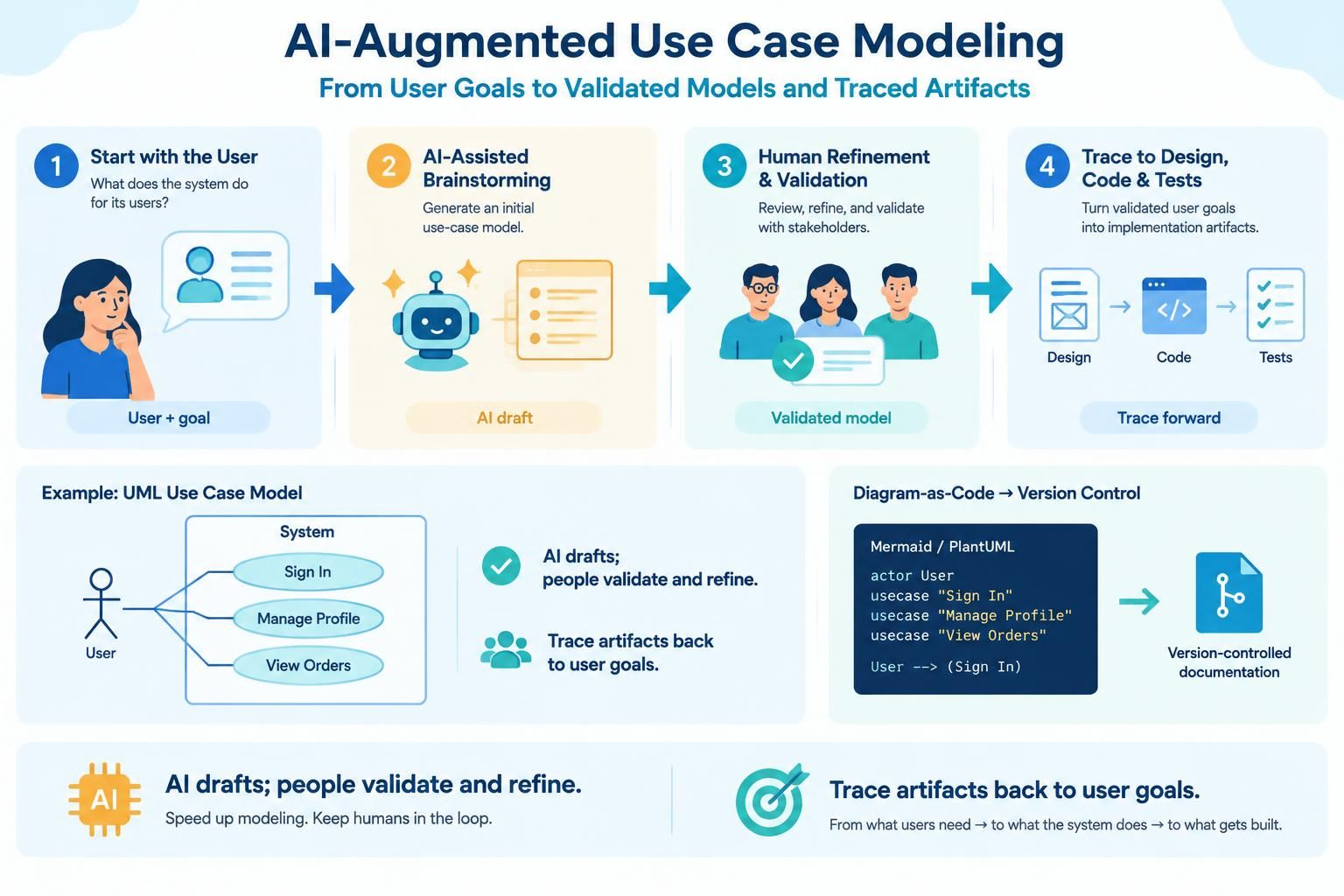
In the fast-paced world of Agile software development, the tension between speed and precision is a constant challenge. Traditional use case modeling, often viewed as a heavyweight, upfront activity, is frequently discarded in favor of lighter user stories. However, for complex systems where user goals are critical to the system’s success, abandoning use case modeling entirely is a mistake. The solution lies in evolution: AI-augmented use case modeling. By integrating Artificial Intelligence into the workflow, teams can achieve the rigor of traditional modeling with the velocity required by Agile sprints.
Reimagining Use Case Modeling for Agile
Traditionally, Agile teams often skip detailed use case modeling, relying solely on User Stories. While effective for simple features, User Stories can sometimes lack the structural depth needed to define complex system behaviors, especially regarding edge cases and actor interactions. This is where the “Use Case” approach shines, provided it is adapted for speed.
Is Use Case Modeling Agile?
The short answer is yes, but only if we redefine what “modeling” means in this context. A rigid, 50-page document created before a single line of code is written is the antithesis of Agile. However, a lightweight, iterative visual model that captures the “User Goal” is highly Agile. The key is treating the model as a living artifact that evolves with the sprint, rather than a static requirement document.
The AI Difference: From Bottleneck to Catalyst
In a traditional workflow, creating a use case model can take days. In an AI-assisted workflow, it takes minutes. Visual Paradigm and similar tools now embed AI directly into the brainstorming phase. This shifts the modeler’s role from “draftsman” to “architect.”
- Traditional Agile: The team spends the first sprint just defining scope. The model is a secondary byproduct.
- AI-Augmented Agile: The AI generates a draft model based on a plain-language description of the scope. The team spends the sprint refining that model, validating it with stakeholders, and tracing it to design. This keeps the focus on value delivery rather than syntax.
Which Project Nature is Most Suitable?
While AI makes modeling faster, it does not make it necessary for every project. Use Case Modeling is most suitable for projects where the interaction between the user and the system is complex or critical. Specifically:
1. Complex Business Logic
If your project involves intricate workflows (e.g., banking transactions, medical records, or logistics), simple user stories often fail to capture the conditional logic. Use cases force the team to think in terms of value delivered and mandatory vs. optional flows, which is vital for system integrity.
2. Multi-Actor Systems
Projects with multiple distinct roles (e.g., “Patient,” “Doctor,” “Admin”) benefit immensely. Use case diagrams provide a high-level map of how these different actors interact with the system, preventing the “siloed” development that often happens when teams only focus on specific user stories.
3. Regulatory or Compliance Heavy Projects
When a system must adhere to strict standards, traceability is non-negotiable. AI-assisted modeling allows teams to maintain these strict standards without the overhead of manual documentation, ensuring that every line of code traces back to a validated user goal.
The Agile Workflow with AI
How does this look in practice? The process transforms from a linear documentation phase into a rapid cycle of discovery and validation.
Step 1: Natural Language Scoping
Instead of drawing boxes, the Product Owner or Business Analyst describes the system in plain English. For example: “A library system where patrons borrow books, staff manage catalogs, and fines are paid.”
Step 2: AI Draft Generation
The AI engine analyzes this description and instantly generates a visual use case diagram. It identifies actors (Patron, Staff), system boundaries, and basic associations. This “AI draft” serves as a conversation starter, not a final artifact.
Step 3: Human Refinement & Validation
The team reviews the AI’s suggestions. This is where human expertise comes in. The team might decide that “Borrow Book” includes “Search Book” because searching is mandatory, or that “Pay Fine” extends “Return Book” because it is conditional. The AI assists by suggesting these relationships, but the human validates them.
Step 4: Tracing to Design
Once the model is validated, the AI can help bridge the gap to implementation. It can generate flow-of-events documentation or even suggest test cases directly from the use case specifications. This ensures that the “Agile” work (coding and testing) is tightly coupled with the “User Goal.”
Step 5: Diagram-as-Code for Version Control
Modern Agile teams often prefer text-based versions of diagrams for version control (Git). AI tools can convert these visual models into Mermaid or PlantUML code automatically. This allows the use case diagram to be reviewed in pull requests alongside the code changes, ensuring that the model and the code remain in sync.
Key Benefits of the AI Approach
The integration of AI into use case modeling addresses several common pain points in software development:
- Accelerated Discovery: Brainstorming sessions that used to take days are reduced to minutes. Teams can iterate through scenarios much faster.
- UML Compliance: AI tools automatically suggest proper UML relationships (like «include» and «extend»), reducing errors that human modelers often overlook.
- Bridging the Gap: By generating “Flow of Events” and linking them to test cases, AI ensures that the use case isn’t just a pretty picture, but a functional specification.
Ultimately, AI-augmented use case modeling restores the value of the “outside-in” perspective. It forces the team to answer the fundamental question: “What does the system do for its users?” before getting bogged down in technical implementation details. For Agile teams dealing with complex systems, this hybrid approach offers the best of both worlds: the speed of modern tooling and the clarity of structured requirements.