
Software architecture is often a mystery to new developers and a source of friction for senior architects. The gap between high-level architectural vision and the granular reality of implementation can be bridged effectively using the C4 model’s Level 4 diagrams. This tutorial explores how to leverage Visual Paradigm, VPasCode, and AI assistance to create living, breathing documentation that actually helps teams move faster.
What is C4 Level 4?
In the C4 model hierarchy, Level 4 is the “Code” level. It sits at the bottom of the abstraction pyramid, zooming in on individual components to reveal the classes, interfaces, and relationships that make up the software’s internal machinery.
Unlike traditional UML class diagrams, which can become bloated attempts to capture every single detail of a system, C4 Level 4 diagrams are purpose-driven. They are designed to answer specific questions about implementation, such as:
- How are design patterns like Strategy or Repository implemented here?
- What are the critical dependencies between these modules?
- How does the domain model map to the API contracts?
The core principle is Selective Detail. You do not draw the whole system; you draw the specific cluster of classes relevant to the architectural narrative you are currently explaining.
The Modern Tooling Ecosystem
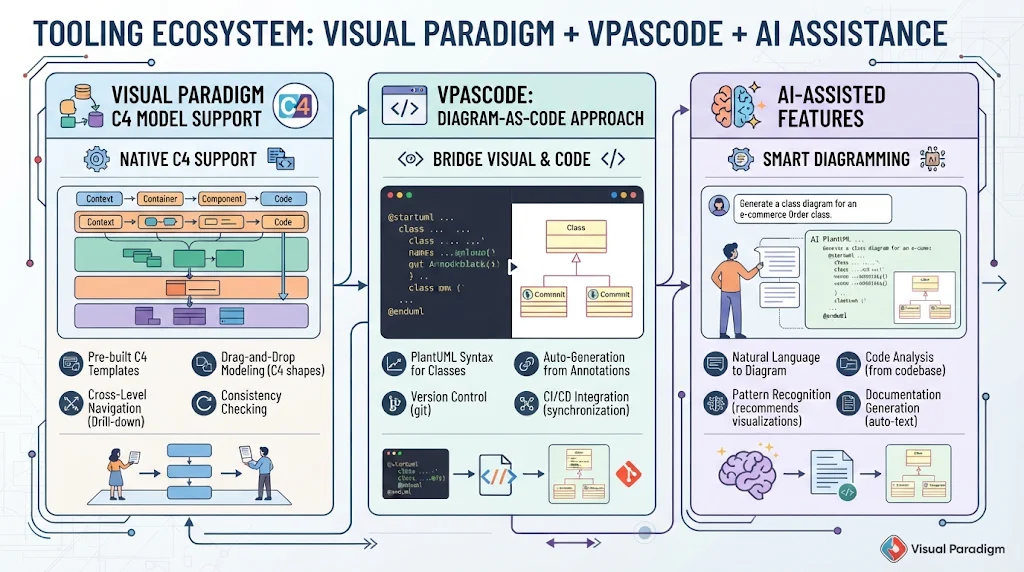
To make Level 4 diagrams sustainable in an agile environment, we need tools that reduce the maintenance burden. The combination of Visual Paradigm, VPasCode, and AI capabilities creates a robust ecosystem for this purpose.
1. Visual Paradigm: The Foundation
Visual Paradigm provides native support for the C4 model, offering pre-built templates and drag-and-drop modeling. It ensures that your diagrams adhere to the standard notation and allows for cross-level navigation, enabling you to drill down from a Context diagram all the way to the Code level seamlessly.
2. VPasCode: Diagram-as-Code
Perhaps the most critical evolution for modern teams is the “Diagram-as-Code” approach. VPasCode bridges the gap between visual modeling and source code management. By supporting PlantUML syntax, it allows you to:
- Store diagrams in the same version control system as your source code.
- Review diagram changes via Pull Requests.
- Automate diagram generation from code annotations.
3. AI-Assisted Features
Artificial Intelligence enhances this workflow by reducing the manual effort required to create and maintain diagrams. AI tools can:
- Generate Diagrams from Text: Describe a class structure in plain English, and the AI generates the corresponding code.
- Analyze Codebases: Scan existing code to suggest class structures.
- Recognize Patterns: Identify common design patterns and recommend appropriate visualizations.
Practical Use Cases for Agile Teams
Why should an agile team invest time in maintaining class diagrams? Here are four scenarios where C4 Level 4 diagrams provide immense value.
Scenario 1: Onboarding New Developers
Imagine a mid-sized e-commerce platform with a monolithic application containing over 500 classes. New hires often get lost trying to understand the critical business logic for order processing. By creating focused Level 4 diagrams for subdomains—such as Order Processing, Inventory Management, and Customer Profiles—you enable new developers to grasp the core logic within days instead of weeks.
Scenario 2: Microservices Migration
When decomposing a legacy monolith into microservices, teams need to identify cohesive class clusters. You can generate class diagrams to visualize coupling. High intra-cluster coupling and low inter-cluster coupling indicate good candidates for separate services, reducing migration risks.
Scenario 3: API Contract Documentation
Traditional API documentation often fails to show how request/response objects relate to internal domain models. Level 4 diagrams can map Data Transfer Objects (DTOs) to domain entities, showing validation rules and transformation logic, which reduces integration errors for API consumers.
Scenario 4: Technical Debt Assessment
When a module becomes difficult to maintain due to tangled dependencies, a class diagram can visually identify “God classes” (classes with excessive responsibilities) or circular dependencies, helping teams prioritize refactoring efforts.
Step-by-Step: Creating a C4 Level 4 Diagram
Let’s walk through the process of creating a class diagram for a specific architectural concern, such as an Order Processing module.
Step 1: Define the Scope
Do not attempt to diagram the entire component. Instead, focus on the narrative. For example, decide that this diagram will focus on the relationship between Order, OrderItem, and Payment classes.
Step 2: Select Classes and Relationships
Identify the key classes and their relationships. In C4 Level 4, we typically show:
- Classes: The specific entities involved in the scenario.
- Interfaces: Abstract definitions that allow for flexibility.
- Relationships: Inheritance, composition, aggregation, and association.
For the Order module, you might define an Order class that contains multiple OrderItem objects and has a relationship with a Payment object.
Step 3: Apply Visual Paradigm Styling
Use the VPasCode syntax to define the diagram. You can apply styles to ensure consistency with the C4 model. For instance, you might define a specific style for classes to ensure they have a white background and black border, keeping the diagram clean and readable.
Step 4: Add Context and Notes
Finally, add notes to the diagram to explain architectural decisions. For example, a note next to the Order class might indicate that it acts as an “Aggregate root for order processing,” providing context that isn’t immediately obvious from the code alone.
Best Practices for Effective Diagramming
Keep Diagrams Focused
Avoid creating massive diagrams that try to show everything. Instead, create multiple small diagrams, each addressing a specific concern. If a diagram requires more than 15-20 classes, consider splitting it into multiple focused diagrams.
Use Consistent Naming
Ensure that class names in your diagrams match the actual code class names. If your code uses OrderServiceImpl, name it the same in the diagram—not just OrderService—to avoid confusion.
Leverage Automation
Use AI tools and VPasCode to generate initial diagrams from code, then refine them manually. This workflow ensures that your diagrams are up-to-date and require minimal manual maintenance.
Maintain Cross-Level Consistency
Ensure that classes shown in Level 4 diagrams belong to components identified in Level 3. Regularly review that component boundaries in Level 3 align with package/module structures in Level 4.
Conclusion
C4 Level 4 class diagrams are a critical bridge between architectural vision and implementation reality. When executed thoughtfully, they provide immense value to development teams, architects, and stakeholders by making complex code structures comprehensible and maintainable.
The combination of Visual Paradigm’s C4 modeling capabilities, VPasCode’s diagram-as-code approach, and AI-assisted generation creates a powerful ecosystem for creating, maintaining, and leveraging class diagrams. By treating diagrams as living documentation that evolves with the codebase, teams can transform architectural documentation from a neglected artifact into a strategic asset that accelerates development and improves code quality.