
In the modern era of information management, traditional pen-and-paper brainstorming often struggles to keep pace with the complexity of project planning and knowledge synthesis. To address this, Visual Paradigm has evolved the concept of mind mapping into a robust engineering discipline through its VPasCode platform. This tutorial explores how to leverage the synergy between Markmap and VPasCode to transform unstructured thoughts into structured, version-controlled visual intelligence.
The Architecture of Modern Mind Mapping
Traditional mind mapping tools rely heavily on graphical user interfaces (GUIs) where users drag and drop shapes. While intuitive for simple sketches, these tools often lack the rigor required for professional documentation. The “Diagram-as-Code” (DaC) paradigm shifts this dynamic. By treating diagrams as text files, we unlock the power of version control systems (like Git), automated rendering, and programmatic generation.
Understanding the Markmap Syntax
The core of this workflow is Markmap, a tool that renders Markdown syntax into interactive mind maps. Unlike rigid diagramming tools, Markmap allows you to think in text. You define the hierarchy using standard Markdown headers, and the engine interprets the indentation to create the visual branches.
When you write a document, you start with a single central concept. This is the anchor. From there, you define the primary branches. In the Markmap syntax, these are typically denoted by Level 1 headers (#). Sub-branches are defined by Level 2 headers (##), and further details by Level 3 (###).
This approach ensures that the structure of your knowledge is strictly hierarchical. It forces the user to categorize information logically before visualizing it. For example, if you are planning a product launch, you might structure your thoughts by department:
- Central Idea: Q4 Product Launch
- Branch 1: Marketing (Social Media, Email)
- Branch 2: Development (Feature Freeze, QA)
- Branch 3: Sales (Training, Pricing)
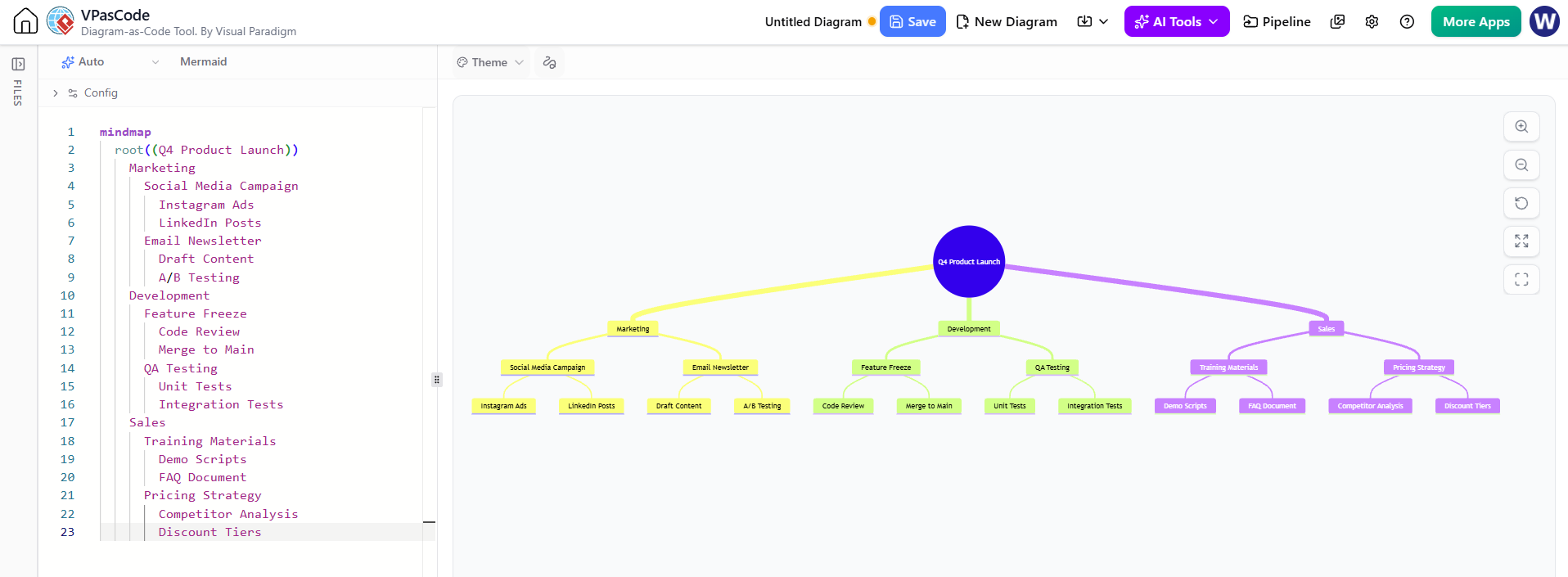
When translated into the Markmap engine, this hierarchy is rendered into a radial graph where the central node is the product launch, and the branches radiate outward. The visual result is a dynamic map where you can zoom, pan, and collapse sections to focus on specific details.
Integrating AI for Rapid Prototyping
One of the most significant advantages of the VPasCode environment is its integration of Artificial Intelligence. In a traditional workflow, you might spend hours manually drawing connections or formatting a map. With AI assistance, the process shifts from manual construction to strategic editing.
The AI assistant in VPasCode acts as a generative partner. Instead of starting with a blank canvas, you can provide a raw text prompt describing your objective. For instance, you might ask the AI to “Create a mind map for launching a new AI-powered meeting summarizer.” The AI then generates a structured draft, complete with initial branches for Product Features, Go-to-Market Strategy, Technical Infrastructure, and Customer Support.
This capability is particularly powerful for overcoming “blank page syndrome.” It allows you to rapidly iterate on ideas. You can ask the AI to refine the diagram by simplifying complex branches or expanding on specific areas. This turns the mind map into a living document that evolves alongside your thought process.
Advanced Modeling with VPasCode
While Markmap is excellent for text-based hierarchies, VPasCode extends these capabilities by supporting other diagram-as-code languages like PlantUML and Mermaid. This flexibility allows for deeper modeling.
Mermaid for Structured Visualization
Mermaid is a JavaScript-based diagramming tool that is highly popular in technical documentation. Within VPasCode, you can utilize Mermaid to create mind maps that offer specific styling options. For example, Mermaid allows for distinct node shapes and colors, which can be used to highlight critical paths or priority items within your map.
The syntax for Mermaid mind maps is slightly different from Markmap. It uses a root node definition (e.g., root((Q4 Product Launch))) and defines children with indentation. This structure is particularly useful when you need to integrate your mind map into technical documentation platforms like GitHub or GitLab, as Mermaid is widely supported in README files.
PlantUML for Engineering Rigor
For more complex systems, PlantUML provides a “tree” syntax that mimics mind mapping but is often more robust for defining strict relationships. This is essential when dealing with Work Breakdown Structures (WBS) or complex system architectures where specific formatting rules must be adhered to.
The VPasCode interface allows you to view the code on the left and the rendered diagram on the right. This split-screen view is crucial for debugging. If a branch is missing or the hierarchy is incorrect, you can see the error immediately in the text editor and correct it. The rendering engine then updates the visualization in real-time.
Practical Applications in Professional Contexts
The versatility of VPasCode and Markmap makes them suitable for a wide range of professional scenarios.
- Product Management: Use the tool to visualize roadmaps and prioritize features. The ability to collapse branches allows you to present high-level summaries to stakeholders and drill down into details during technical reviews.
- Project Planning: Break down complex tasks into manageable sub-tasks. You can track progress by visually editing the map to reflect completed work.
- Learning & Education: Students can use Markmap to summarize lecture notes. By converting long paragraphs of text into a hierarchical map, they can better retain information and understand the relationships between concepts.
- Collaboration: Because the diagrams are stored as code, they can be version-controlled. Teams can collaborate using Git, reviewing changes via pull requests. This ensures that the evolution of the project plan is documented and traceable.
Best Practices for Effective Mind Mapping
To get the most out of VPasCode and Markmap, it is essential to follow certain best practices.
1. Start Simple
Begin with a rough sketch of your central idea and main branches. Do not worry about perfection initially. The goal is to capture the structure. You can refine the details later.
2. Use Consistent Formatting
Stick to a consistent hierarchy. If you use # for main branches, ensure you use ## for sub-branches. This consistency is key for both readability and automated processing.
3. Leverage Colors and Icons
While Markmap is text-based, it supports visual elements. Assign colors to different categories (e.g., blue for technical, green for marketing) to improve visual scanning. Use icons to enhance memory association.
4. Iterate with AI
Use the AI to generate a first draft, then manually refine it. This saves time while ensuring accuracy. You can ask the AI to reorganize branches or suggest improvements based on your input.
5. Export and Share
Once your map is complete, you can export it as an image (PNG, SVG) or PDF for presentations. Alternatively, you can embed the interactive version directly into Confluence, Notion, or GitHub READMEs, allowing others to interact with the map.
Conclusion
Mind mapping has evolved from a static exercise into a dynamic, collaborative process. By combining traditional mind mapping principles with modern tools like Visual Paradigm’s Markmap and VPasCode, you can unlock new levels of efficiency and clarity. The integration of Diagram-as-Code approaches with AI assistance transforms the way we organize knowledge, making it accessible, version-controlled, and infinitely scalable.
Whether you are a product manager planning a roadmap, a developer designing a system, or a student preparing for exams, these tools empower you to think visually and act decisively. Start small, experiment with different formats, and leverage AI to accelerate your workflow. With practice, mind mapping will become an indispensable part of your productivity toolkit.